 offline access
Buy Lawn Mowing Simulator Steam Offline Account
This is a Lawn Mowing Simulator offline account on bonege: a shared Steam account that already owns the game, yours for a one-time $9.99 instead of the ~$19.99 full Steam price (save ~50%). You log into the account, switch Steam to Offline Mode, and play the full single-player career on your own PC. Delivery is instant and automated, payment is crypto only, and it works worldwide with no region lock.
Key facts
- Price on bonege
- $9.99 — one-time
- Full Steam price
- ~$19.99 (save ~50%)
- What it is
- Shared Steam offline account that owns Lawn Mowing Simulator
- How you play
- Steam Offline Mode — full single-player career
- Delivery
- Instant & automated
- Payment
- Crypto — USDT (TRC20), BTC, ETH, LTC
- Region
- Worldwide, no region lock
- Guarantee
- Free replacement if access stops
What you get
- Steam account that already owns the game
- Step-by-step offline-mode guide
- Instant automated delivery after payment
- Replacement guarantee if access stops
Buy Lawn Mowing Simulator cheap — offline account
What you get
You get login access to a Steam account that already owns Lawn Mowing Simulator, delivered for a one-time $9.99. After payment clears, the credentials arrive automatically, so there is no waiting around for a manual handover and no back-and-forth with support. You sign in on your own PC, set Steam to Offline Mode, and the game is sitting right there in the library, ready to install and launch. Nothing is a code you redeem and nothing is a gift you wait on; the ownership is already on the account.
This is a shared offline account, which is exactly why the price sits at $9.99 instead of the ~$19.99 you would pay at full price on Steam — that is roughly 50% less for the same single-player game. The account is yours to use for the campaign and the chill, free-roam mowing that Lawn Mowing Simulator is built around. You keep your saves locally, you tweak graphics to your own hardware, and you play at your own pace. If access ever stops working, the free replacement guarantee covers you, so you are not left with a dead login and an empty wallet.
How a Lawn Mowing Simulator offline account works
The flow is simple and the same every time. You buy the Lawn Mowing Simulator offline account, the credentials land in your inbox instantly, and you enter them into the Steam client on your computer. Once you are signed in, you open the Steam menu and pick Go Offline. From that point Steam stops talking to its servers for that session, which is precisely the point: Offline Mode lets you run the game without bumping into the live account session, so you can mow uninterrupted whenever you like.
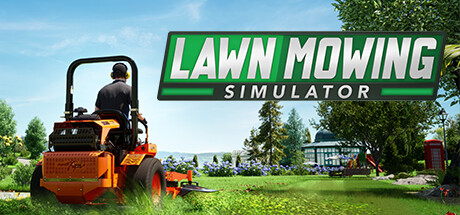
Lawn Mowing Simulator is a calm, single-player simulation, so Offline Mode fits it perfectly. You drive licensed, real-brand ride-on mowers across detailed stretches of the British countryside, take on contracts, and grow your little landscaping business one lawn at a time. None of that needs an online connection or a multiplayer lobby — it all runs offline on this account. Install the game once while signed in, switch to Offline Mode, and you can come back to your career session after session. This is what people mean by a lawn mowing simulator offline mode setup: a ready account, the game already owned, and a quiet single-player experience that asks nothing of the live session.
Cheaper than a Steam key
A Steam key for Lawn Mowing Simulator at full price runs about $19.99, and even discounted keys from third-party stores often land higher than what you pay here. This offline account is $9.99 flat — a one-time payment, no subscription, no recurring charge — which works out to roughly half of the full Steam price. If your goal is to play the single-player career without overspending, a cheap Lawn Mowing Simulator steam account like this is one of the cheapest ways in.
The trade-off is honest and worth understanding. A key activates the game on your own Steam account forever; this is a shared offline account, so you play through Offline Mode on the account we provide rather than on your personal profile. For a relaxing solo simulator with no competitive or online component, that distinction rarely matters in practice — the gameplay is identical. What you gain is the lower price, instant access, and crypto payment with no card and no region restrictions. That is the appeal of buying a Lawn Mowing Simulator steam account this way: you get the same mowing campaign for the cheapest price without paying full retail for a key.
Is it safe?
We are straight about what this is: a shared offline account, not an official key and not a personal Steam license. You play in Offline Mode, which keeps your single-player sessions self-contained and avoids clashing with the live account. Delivery is automated, so the same tested credentials reach every buyer the moment payment confirms, and you are not relying on a stranger to type something out by hand. Treat it as a play-the-game arrangement rather than an account you own outright, and the experience is smooth.
Payment runs entirely on crypto — USDT (TRC20), BTC, ETH, or LTC — which means no card details change hands and nothing is tied to your bank or your region. Because there is no region lock, the Lawn Mowing Simulator offline account works the same no matter if you are in the US, the UK, Canada, Australia, or across Europe. And if access ever drops for any reason, the free replacement guarantee kicks in: contact support and we sort out a working login. You are buying access to play, backed by a replacement promise, not a gamble that ends the moment something hiccups.
About Lawn Mowing Simulator
Lawn Mowing Simulator drops you into the quiet business of cutting grass across the Great British countryside, and it takes that premise more seriously than the name might suggest. You climb aboard authentic, fully licensed ride-on mowers from real manufacturers, each modelled with its own handling, cutting deck, and quirks, then head out to manicure sprawling estates, tidy gardens, and rolling rural plots. The detail is the draw: the way the grass reacts, the routes you plan to get clean, even stripes, and the satisfying rhythm of finishing a lawn properly.
Underneath the relaxation sits a genuine career and business layer. You start small, take on contracts, earn money, and reinvest it into better machines, upgrades, and staff as your landscaping company grows. Managing your fleet, picking the right mower for each job, and balancing speed against a clean cut give the game a steady sense of progression beyond the meditative mowing itself. It is squarely a single-player simulation experience, which is why it suits an offline account so well — there is no PvP, no online grind, just you, your mowers, and a long list of lawns waiting to be made perfect, all playable in Steam Offline Mode on this account.
// pros
- Save ~50% — $9.99 one-time vs the ~$19.99 full Steam price
- Instant, automated delivery the moment payment confirms
- Full single-player career and free-roam mowing, playable offline
- Crypto payment (USDT, BTC, ETH, LTC) — no card, no region lock
- Free replacement guarantee if access ever stops
// good to know
- · Single-player and offline only — no online or multiplayer features
- · You play in Steam Offline Mode on a shared account, not your own profile
Playing Lawn Mowing Simulator offline
Pay with crypto
Checkout in USDT, BTC, ETH or LTC — no card needed.
Get the login
We deliver the account that owns the game, automatically, in minutes.
Play offline
Sign in, switch Steam to Offline Mode with our guide, and enjoy the full game.
Lawn Mowing Simulator — questions
Can you play Lawn Mowing Simulator offline?
Yes. You sign into the account, switch Steam to Offline Mode, and play the full single-player career on your own PC without an internet connection for that session.
How much is Lawn Mowing Simulator on bonege?
It is $9.99 as a one-time payment, compared to the ~$19.99 full Steam price — roughly 50% less for the same single-player game.
How fast is delivery?
Instant and automated. As soon as your crypto payment confirms, the account credentials are sent to you so you can sign in and start playing.
How do I pay?
Crypto only — USDT (TRC20), BTC, ETH, or LTC. There are no card payments, and there is no region lock anywhere.
What's the difference vs a Steam key?
A key activates the game on your own account forever. This is a shared offline account that already owns the game, so you play through Steam Offline Mode for $9.99 instead of paying full retail for a key.
Is it safe?
It is a shared offline account, delivered automatically and played in Offline Mode. It works worldwide, and if access ever stops, the free replacement guarantee covers you.



