 offline access
Buy King Smash Steam Offline Account
A King Smash Steam offline account is a ready-made Steam login that already owns the game. You sign in, switch Steam to Offline Mode, and play the full action campaign for $4.99 — one payment, no card needed. Delivery is instant and automated, payment is in crypto, and access works worldwide with no region lock. If access ever stops, you get a free replacement.
Key facts
- Price on bonege
- $4.99 — one-time
- What it is
- Steam offline account that already owns King Smash
- How you play
- Steam Offline Mode — single-player action campaign
- Delivery
- Instant & automated
- Payment
- Crypto — USDT (TRC20), BTC, ETH, LTC
- Region
- Worldwide, no region lock
- Guarantee
- Free replacement if access stops
What you get
- Steam account that already owns the game
- Step-by-step offline-mode guide
- Instant automated delivery after payment
- Replacement guarantee if access stops
Buy King Smash cheap — offline account
What you get
You get a King Smash offline account: a working Steam login that already has the game sitting in its library, ready to download and run. There is no key to redeem, no gift invite to accept, and no subscription that renews. After payment you receive the credentials automatically, you log into the Steam client, let King Smash install, and then flip Steam into Offline Mode to play. The whole thing is a flat $4.99, paid once, with nothing else to add later.
This is the simplest path to playing King Smash if you do not want to use a card or worry about where you live. The account does the owning for you, so you skip the usual store checkout entirely. You install the game like you would install anything else on Steam, and from that point on it behaves like a normal local install — your saves, your settings, your control bindings all live on your own machine.
To be clear about what this is not: it is not your personal account, it is not an online multiplayer pass, and it is not a Steam key you activate on your own profile. It is a shared offline account built for the single-player side of King Smash. That is exactly what the game is — a solo action brawler — so the offline approach fits it perfectly and there is nothing you miss by playing this way.
How a King Smash offline account works
The flow is short. You pay in crypto, the system sends you the King Smash account login right away, and you enter those details into the official Steam desktop client. Steam will ask for the usual login confirmation the first time; once you are in, you find King Smash in the library and hit install. When the download finishes, open the Steam menu and choose Go Offline. That switches the client to Offline Mode, and now you can launch and play King Smash any time without staying connected to a live session.
Offline Mode is a standard, built-in Steam feature — it exists so people can play single-player games without a constant connection. For a King Smash offline account this is the intended way to use it. You boot the game, smash through the king's campaign, and Steam never needs you to be online for the action to run. Your progress is stored locally on your computer, so closing the game and coming back later picks up right where you left off.
A few practical notes. Keep the credentials to yourself and avoid changing the account's core settings, since it is a shared login meant for offline play. If you ever lose access for any reason, message support and you get a free replacement account that owns King Smash, so you are not left without the game you paid for. Treat it as a dedicated game login rather than a profile you customize, and the experience stays smooth.
Why buy King Smash this way
The honest pitch here is convenience and access, not a discount. King Smash is an inexpensive action game, and this offline account gives you a frictionless way to get into it: $4.99, paid once, with delivery that lands in your inbox seconds after the crypto payment confirms. There is no waiting on a regional store, no card details to type in, and no account of your own to set up if you do not already have one configured the way you want.
Crypto payment is the core advantage for a lot of buyers. You pay with USDT (TRC20), BTC, ETH, or LTC, which means no card is required and your bank is not involved. That also sidesteps region locks — wherever you are, the King Smash account works the same, because access does not depend on a local storefront or a regional payment method. For anyone who prefers privacy or simply does not want to use a card for a small purchase, this is a clean option.
On top of that, you are buying something that is already done. The King Smash account is set up, the game is already owned, and all that is left for you is to log in and play. Combine the instant automated delivery, the crypto-only checkout, the worldwide reach, and the free replacement guarantee, and you have a low-effort route to a cheap action game without any of the usual store hoops.
Is it safe?
Let's be straight about it: this is a shared offline account, not your own Steam profile, and we describe it exactly that way. It is not labeled official, and it is not a personal license tied to your name. What makes it safe to use day to day is the Offline Mode setup — once King Smash is installed and Steam is offline, the game runs locally and you are not exposed to live-session prompts or sign-in interruptions while you play.
The strongest safety net is the replacement guarantee. Accounts can occasionally stop working for reasons outside your control, and if that happens with your King Smash offline account, support issues a free replacement that owns the same game. You are paying $4.99 for access to play King Smash, and the guarantee exists so that access keeps holding up. Reach out through support and you get sorted without extra cost.
Use a little common sense and you will be fine. Stick to Offline Mode for playing, do not try to change the login email or password, and do not share the credentials around. Because King Smash is a single-player title, you never need the account for online matchmaking anyway, which keeps the whole setup simple and low-risk. Play the campaign, enjoy it, and lean on the replacement promise if anything ever interrupts your access.
About King Smash
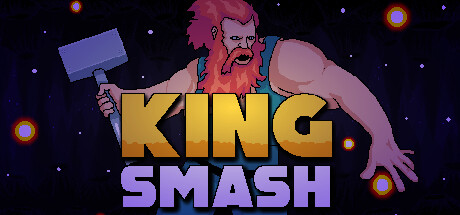
King Smash is an action game built around a brutal, hammer-swinging premise. You play a king who picks the hammer back up and remembers the old days — the days when he crushed the skulls of his enemies and carved a bloody path all the way to the crown. Now he sets out again, this time to cleanse his own realm, and the whole game leans into that heavy, smash-everything fantasy of a ruler who would rather fight than rule from a throne.
As a single-player action title, King Smash is exactly the kind of game the offline account format suits. The focus is on combat and momentum: charging in, swinging the hammer, and clearing the way forward. It is a compact, no-nonsense brawler rather than a sprawling open world, which makes it an easy pick-up for a session whenever you feel like cracking some skulls and pushing the king's campaign a little further.
If you like direct, physical action where the king himself is the weapon, King Smash delivers that loop cleanly. The offline account gives you the full game to play through at your own pace in Steam Offline Mode, with your progress saved locally so you can return to the king's bloody crusade whenever you want. For $4.99 with instant crypto delivery and a free replacement guarantee, it is a low-commitment way to step into the role and start swinging.
// pros
- One flat price of $4.99, paid once with nothing extra later
- Instant, automated delivery seconds after crypto payment confirms
- Full single-player action campaign playable in Steam Offline Mode
- Crypto payment (USDT, BTC, ETH, LTC) — no card, no bank, no region lock
- Free replacement account if access ever stops
// good to know
- · Single-player / offline only — no online multiplayer
- · You play in Steam Offline Mode on a shared account, not your own profile
Playing King Smash offline
Pay with crypto
Checkout in USDT, BTC, ETH or LTC — no card needed.
Get the login
We deliver the account that owns the game, automatically, in minutes.
Play offline
Sign in, switch Steam to Offline Mode with our guide, and enjoy the full game.
King Smash — questions
Can you play King Smash offline?
Yes. You log into the King Smash offline account, install the game, then switch Steam to Offline Mode and play the full single-player campaign locally with no live connection needed.
How much is King Smash on bonege?
King Smash is $4.99 on bonege — a one-time payment with instant delivery and nothing else to add.
How fast is delivery?
Delivery is instant and automated. As soon as your crypto payment confirms, the King Smash account login is sent to you so you can log in and start playing.
How do I pay?
Payment is in crypto only — USDT (TRC20), BTC, ETH, or LTC. No card or bank account is required, and there is no region lock.
What's the difference vs a Steam key?
A key activates on your own account. This is a shared offline account that already owns King Smash — you log in and play in Offline Mode instead of redeeming anything on your own profile.
Is it safe?
It is a shared offline account, used in Steam Offline Mode for single-player play. Keep the login private, do not change account settings, and if access ever stops you get a free replacement.



