 offline access
Buy Invasion 2037 Steam Offline Account
This is a ready Invasion 2037 Steam offline account that already owns the game. You sign in, switch Steam to Offline Mode, and play the full single-player survival campaign. The price is a flat $9.99, one time. Delivery is instant and automated, payment is crypto only (USDT TRC20, BTC, ETH, LTC), and it works worldwide with no region lock.
Key facts
- Price on bonege
- $9.99 — one-time
- What it is
- Steam offline/shared account that already owns Invasion 2037
- How you play
- Steam Offline Mode — single-player survival campaign
- Delivery
- Instant & automated
- Payment
- Crypto — USDT (TRC20), BTC, ETH, LTC
- Region
- Worldwide, no region lock
- Guarantee
- Free replacement if access stops
What you get
- Steam account that already owns the game
- Step-by-step offline-mode guide
- Instant automated delivery after payment
- Replacement guarantee if access stops
Buy Invasion 2037 cheap — offline account
What you get
You get login access to a Steam account that already owns Invasion 2037, plus a short set of instructions for putting Steam into Offline Mode. There is nothing to redeem and no waiting around for a code to clear. After you pay, the account credentials arrive automatically, you log in on your own PC, set Steam offline, and the game is right there in the library ready to install and launch. The whole point of an Invasion 2037 offline account is that the heavy lifting of buying and registering the game is already done for you.
Because this is a shared offline account, the price stays flat at $9.99 with no subscription, no recurring charge and no hidden tiers. You are paying once for offline access to the full single-player experience. That includes the survival systems the game is built around: managing your shelter, scavenging for materials in a post-apocalyptic landscape, and surviving in a world that alien forces have taken over. Everything that runs locally in single-player is available to you in Offline Mode.
It helps to know what this is not. It is not a Steam key, not a gift, and not a subscription. You will not be adding Invasion 2037 to your own personal Steam library as a permanent purchase under your own name. Instead you use the provided offline account when you want to play. If you only care about playing the game's single-player survival campaign and you want the cheapest sensible route to do that, this is the model that fits.
How an Invasion 2037 offline account works
The flow is simple and the same every time. You receive the account details after checkout. You open Steam, log in with those details, and once the library loads you go to the Steam menu and choose Go Offline. From that point Steam stops talking to its servers and you can launch Invasion 2037 without anyone else needing the account at the same moment. This is the standard Invasion 2037 offline mode setup, and it is exactly how shared offline accounts are meant to be used.
The first launch is the only part that needs an internet connection, because Steam has to validate the session and download the game files before you switch offline. Once Invasion 2037 is installed locally and you have entered Offline Mode at least once, you can keep playing without staying connected. Your save data for the survival run lives on your own machine, so your shelter, your gathered resources and your progress through the campaign stay with you between sessions.
A few practical notes keep things smooth. Do not change the account password, email, or any account-level settings, since this is a shared offline account and others rely on the same login. Stick to Offline Mode for playing rather than going online with it. Follow those two rules and the account behaves like a normal Steam install of Invasion 2037 sitting quietly on your PC, ready whenever you want another survival session.
Why buy it on bonege
The clearest reason is convenience at a fixed, honest price. Invasion 2037 is an Early Access action-adventure survival sim, and an offline account lets you jump straight into it for $9.99 without setting up payment methods that may not work in your region. There is no card form, no billing address, and no regional store to fight with. You pay with crypto and the account is delivered to you automatically within moments of confirmation.
Crypto payment is a real advantage rather than a gimmick. We accept USDT on TRC20, plus BTC, ETH and LTC, which means anyone anywhere can buy without worrying about whether their local card is accepted or whether a regional block stands in the way. There is no region lock on the account itself either, so a player in the US, UK, Canada, Australia or across the EU goes through the identical process and gets the identical result.
Speed is the other half of it. Because delivery is fully automated, you are not waiting on a human to mark your order or hand-deliver anything. The moment your crypto payment confirms, the system releases your Invasion 2037 account credentials. Combined with the flat $9.99 price and the free replacement guarantee, the offer is meant to be simple: pay, receive, go offline, play the survival campaign.
Is it safe?
Let's be plain about what you are buying. This is a shared offline Steam account, not your own personal account and not an official key. We say that openly because it matters for how you use it: you play in Offline Mode, you keep your hands off the account settings, and you treat it as a tool for running the single-player game rather than as an account to personalize. Used that way, it is a stable and low-fuss way to play Invasion 2037.
Every Invasion 2037 offline account comes with a free replacement guarantee. If access stops working for you at any point, contact support and we will replace it. That guarantee exists precisely because shared accounts can occasionally need swapping, and we would rather you keep playing than be left stuck. You are not gambling on a one-shot delivery with no recourse; the replacement promise is part of the $9.99 you pay.
There are limits worth being honest about, and they all come from the offline model. You will not get online multiplayer through this account, and you should not expect to use it as if it were your own permanent library. Invasion 2037 is primarily a solo survival experience, so for most players those limits are not a problem at all. If you understand that you are buying offline single-player access on a shared account, there are no surprises waiting for you later.
About Invasion 2037
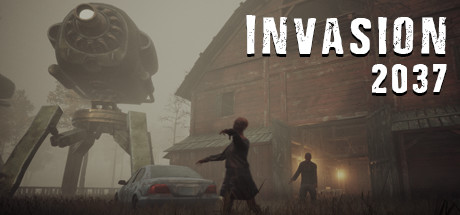
Invasion 2037 drops you into a wrecked future where an alien force has seized control of the planet and human survivors are scattered and hunted. You take on the role of a survival scientist whose job is bigger than just staying alive day to day: you are searching for a cure that could turn the situation around. That goal hangs over the moment-to-moment grind of scavenging, crafting and defending yourself, giving the survival loop a clear sense of purpose.
Most of your time goes into building and managing a shelter. You gather materials from a dangerous post-apocalyptic world, reinforce your base, and balance the constant pressure of threats outside against your need for food, supplies and research progress inside. The game blends action, adventure, indie creativity and simulation systems, so a single session can swing from a tense fight to careful resource planning to pushing a little further toward that elusive cure.
As an Early Access title, Invasion 2037 is a game that has been growing over time, which is part of its appeal for survival fans who like watching a world get deeper as content arrives. With an offline account you can experience the single-player campaign on your own schedule, install it once, switch Steam to Offline Mode, and dig into the shelter-building, scavenging and survival fight whenever the mood strikes — all for a flat $9.99.
// pros
- Flat $9.99 one-time price, no subscription or recurring charges
- Instant, fully automated delivery after crypto payment confirms
- Play the full single-player survival campaign in Steam Offline Mode
- Crypto payment (USDT TRC20, BTC, ETH, LTC) — no card, no region lock, worldwide
- Free replacement guarantee if access ever stops working
// good to know
- · Single-player / offline only — no online multiplayer
- · You play in Steam Offline Mode on a shared account, not your own personal account
Playing Invasion 2037 offline
Pay with crypto
Checkout in USDT, BTC, ETH or LTC — no card needed.
Get the login
We deliver the account that owns the game, automatically, in minutes.
Play offline
Sign in, switch Steam to Offline Mode with our guide, and enjoy the full game.
Invasion 2037 — questions
Can you play Invasion 2037 offline?
Yes. You log into the provided account, switch Steam to Offline Mode, and play the full single-player survival campaign without staying connected after the first launch.
How much is Invasion 2037 on bonege?
It is a flat $9.99, one time, for an offline/shared Steam account that already owns Invasion 2037. There is no subscription or recurring fee.
How fast is delivery?
Instant and automated. As soon as your crypto payment confirms, the account credentials are released to you automatically — no waiting on a person.
How do I pay?
Crypto only: USDT (TRC20), BTC, ETH or LTC. There is no card payment, which means no regional card blocks and no billing details to enter.
What's the difference vs a Steam key?
A key adds the game to your own account permanently. This is instead a shared offline account that already owns Invasion 2037 — you play it in Offline Mode rather than redeeming anything to your own library.
Is it safe?
It is a shared offline account, used in Offline Mode for single-player. Don't change the account settings, and if access ever stops, you get a free replacement.



