 offline access
Buy Granny Simulator Steam Offline Account
This is a ready Granny Simulator Steam offline account for $4.99 — a one-time payment, not a key or subscription. You log into a Steam account that already owns the game, switch Steam to Offline Mode, and play. Delivery is instant and automated, payment is crypto only (USDT, BTC, ETH, LTC), and it works worldwide with no region lock.
Key facts
- Price on bonege
- $4.99 — one-time
- What it is
- Steam offline account that already owns Granny Simulator
- How you play
- Steam Offline Mode — log in, go offline, play
- Delivery
- Instant & automated
- Payment
- Crypto — USDT (TRC20), BTC, ETH, LTC
- Region
- Worldwide, no region lock
- Guarantee
- Free replacement if access stops
What you get
- Steam account that already owns the game
- Step-by-step offline-mode guide
- Instant automated delivery after payment
- Replacement guarantee if access stops
Buy Granny Simulator cheap — offline account
What you get
You get login access to a Steam account that already owns Granny Simulator, plus a short, clear set of instructions for getting into the game. There is nothing to activate, no code to redeem, and no waiting for a region to unlock. Once payment clears you receive the credentials automatically, sign in through the normal Steam client, set the client to Offline Mode, and the game is right there in the library ready to launch. This is a shared offline account, so the price you pay is a flat $4.99 one-time charge with no recurring fees attached.
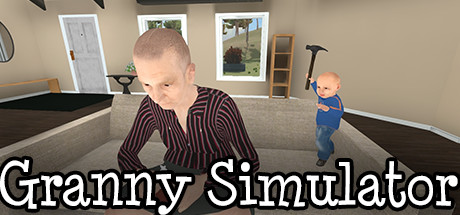
Granny Simulator is an Early Access physics sandbox where one player controls a frail grandmother trying to finish her daily chores while a second player, the grandson, does everything possible to ruin them. On this offline account you have full access to that content: the house, the yard, the ragdoll grandma, the chaotic tools and traps, and the goofy task-based gameplay the game is known for. You are not renting a trial or a limited demo — you are playing the real game from a Granny Simulator offline account that holds the full license.
Because the account is delivered ready to use, the cheap Granny Simulator Steam experience here is about speed and simplicity. You do not need a card, you do not need to be in a specific country, and you do not need to set up anything beyond logging in. For a small, lighthearted indie title like this, that low-friction path is the whole point — pay, receive, go offline, and start messing around in the grandma sandbox within minutes.
How a Granny Simulator offline account works
The Granny Simulator offline account works through Steam's built-in Offline Mode, a standard feature of the Steam client. After you receive the login details, you sign into the Steam desktop app with them once while connected to the internet so the client can verify the account and cache the game files. From there you open the Steam menu and select Go Offline. The client then runs without needing to phone home, and Granny Simulator launches straight from the local library. This is the same Offline Mode Valve provides to every Steam user — nothing unofficial is being done to the client.
Granny Simulator is designed around two players sharing one screen in local co-op, with one person playing grandma and the other playing the grandson on a second controller. Because that co-op is local rather than online, it fits an offline account perfectly: plug in two controllers, hand one to a friend, and you can both play the chaos together on the same machine without any server connection. If you prefer to play solo, you can still control the grandmother and work through her routine on your own, experimenting with the physics and the various tasks at your own pace.
Keep one thing in mind about how you use it: you play in Steam's Offline Mode on the account we provide, not on your own personal Steam profile. Your achievements, friends list, and any progress stay tied to this shared offline account rather than transferring to a profile you already own. For a casual title you just want to jump into and laugh at, that trade-off is usually a non-issue, but it is worth knowing before you buy a granny simulator shared account.
Why buy a Granny Simulator offline account
The clearest reason to buy a Granny Simulator Steam account this way is convenience combined with payment freedom. You pay $4.99 in crypto and the access lands in your inbox automatically — no checkout forms tied to a bank, no billing address, no card declines for a buyer in the wrong country. If you want to pay with USDT, BTC, ETH, or LTC and skip cards entirely, this is a straightforward route to a Granny Simulator account that simply works.
Region is the other big advantage. Some buyers run into store restrictions, currency conversion headaches, or availability gaps depending on where they live. An offline account sidesteps all of that: there is no region lock, so the same $4.99 price and the same instant delivery apply no matter if you are in the US, the UK, Canada, Australia, or the EU. You are buying access to a copy that already exists and already owns the game, which is what makes the worldwide, no-restriction part possible.
Finally, the access is backed by a free replacement guarantee. If the account ever stops letting you in, you contact support and we replace it — you are not left stranded over a $4.99 purchase. Between instant automated delivery, crypto payment, worldwide availability, and that replacement safety net, the granny simulator cheapest price route here is built to be low-risk and quick rather than a gamble.
Is it safe?
It is a shared offline account, and we describe it exactly as that — not a key, not an official store gift, and not your own permanent Steam profile. Being upfront matters, so here is the honest picture: you log into an account we supply, you switch to Offline Mode, and you play Granny Simulator there. As long as you stay in Offline Mode as instructed and treat the account as a play-only login, the setup is stable and the game stays available to you.
The safest way to use a Granny Simulator offline account is to follow the short instructions we send and avoid changing account settings, passwords, or email details, since those are shared resources. Stick to launching the game in Offline Mode and you will not run into the friction that comes from trying to use a shared login like a personal one. If anything does interrupt your access, the free replacement guarantee is there to cover you, so a single hiccup never means losing what you paid for.
We do not make inflated promises about this product. There are no fake reviews, no claims of being an official reseller, and no pretending it is something it is not. What we offer is honest, working offline access to Granny Simulator at a flat $4.99, delivered instantly, paid in crypto, available worldwide, and backed by replacement support. That clarity is the point — you know precisely what you are getting before you pay.
About Granny Simulator
Granny Simulator is a physics-driven comedy sandbox built around two characters with opposite goals. One player is a wobbly, ragdoll-controlled grandmother whose job is to get through her everyday routine — household chores, errands, and small tasks around the home and yard. The second player takes on her grandson, whose entire purpose is to interfere, sabotage, and turn grandma's quiet day into pure slapstick disaster. The contrast between the two roles is where most of the laughs come from.
The game leans hard into clumsy, exaggerated physics. Grandma flops, stumbles, and overreacts to the world around her, and the tools, objects, and traps in the environment all respond in deliberately chaotic ways. It sits in the Casual, Indie, and Simulation space and is still in Early Access, meaning the developers have been expanding tasks, mechanics, and the sandbox over time. That early-access nature gives it a loose, experimental charm — it is a game about poking at a silly system and seeing what ridiculous outcome you can cause.
It is best enjoyed as a short-session party piece, especially with a friend on the couch using two controllers, though solo experimentation with grandma's routine is perfectly playable too. If you want a cheap, funny, low-commitment title to mess around with, Granny Simulator delivers exactly that, and an offline account is a quick, no-fuss way to get into it for $4.99.
// pros
- Flat $4.99 one-time price with no recurring fees
- Instant, automated delivery after payment
- Full game playable offline, including local two-player co-op
- Crypto payment — USDT, BTC, ETH, LTC — no card needed
- Worldwide access with no region lock, plus free replacement guarantee
// good to know
- · Local/offline play only — no online multiplayer
- · You play in Steam Offline Mode on a shared account, not your own personal profile
Playing Granny Simulator offline
Pay with crypto
Checkout in USDT, BTC, ETH or LTC — no card needed.
Get the login
We deliver the account that owns the game, automatically, in minutes.
Play offline
Sign in, switch Steam to Offline Mode with our guide, and enjoy the full game.
Granny Simulator — questions
Can you play Granny Simulator offline?
Yes. You log into the account we provide, switch the Steam client to Offline Mode, and launch Granny Simulator from the library. Its co-op is local with two controllers, so it works fully offline.
How much is Granny Simulator on bonege?
It is $4.99 as a one-time payment for a ready Steam offline account that already owns the game. There are no subscriptions or recurring charges.
How fast is delivery?
Delivery is instant and automated. As soon as your crypto payment clears, the login details and instructions are sent to you automatically — usually within minutes.
How do I pay?
Payment is crypto only: USDT (TRC20), BTC, ETH, or LTC. There are no card payments, so there is no billing address or region requirement.
What's the difference vs a Steam key?
A key activates the game on your own Steam profile. This is an offline account — a shared login that already owns Granny Simulator, which you play in Steam Offline Mode rather than on your personal account.
Is it safe?
Yes, when used as intended. Stay in Offline Mode, don't change shared account settings, and follow the instructions. If access ever stops, you get a free replacement.



