 offline access
Buy Farlands Steam Offline Account
A Farlands Steam offline account costs $9.99 on bonege versus about $17.99 on Steam — you save roughly 44%. You receive login details for a shared Steam account that already owns Farlands, switch Steam to Offline Mode, and play the full single-player farming sim. Delivery is instant and automated, payment is crypto, and it works worldwide with no region lock.
Key facts
- Price on bonege
- $9.99 — one-time
- Full Steam price
- ~$17.99 (save ~44%)
- What it is
- Shared Steam offline account that already owns Farlands
- How you play
- Steam Offline Mode — single-player farming sim
- Delivery
- Instant & automated
- Payment
- Crypto — USDT (TRC20), BTC, ETH, LTC
- Region
- Worldwide, no region lock
- Guarantee
- Free replacement if access stops
What you get
- Steam account that already owns the game
- Step-by-step offline-mode guide
- Instant automated delivery after payment
- Replacement guarantee if access stops
Buy Farlands cheap — offline account
What you get
You get login credentials for a shared Steam account that already owns Farlands, plus a short setup guide that walks you through signing in and switching Steam into Offline Mode. Once you are in, the game sits in the library ready to download and launch. There is nothing to redeem, no key to enter, and no waiting on a manual hand-off — the account is prepared in advance and sent to you automatically the moment payment confirms. This is the Farlands offline account in its plainest form: ready to play.
For $9.99 you cover the full single-player experience. That means the complete farming-and-survival loop on your own planet — clearing land, planting and harvesting crops, raising animals, crafting tools, exploring the surface of your strange agrarian rock, and slowly turning a barely habitable lump at the edge of the galaxy into something that runs. Because Farlands is still in Early Access, the offline account also picks up whatever content and patches are already attached to the build on Steam, so you are not stuck on an old version.
What you are paying for is access, not ownership of the Steam account itself. The login stays a shared, offline-only credential — you use it to play Farlands in Offline Mode, and if access ever stops working you contact support for a free replacement. That keeps the price low and the delivery instant, which is the whole point of buying a Farlands account this way instead of paying the full Steam price.
How a Farlands offline account works
The flow is short. After checkout you get the Farlands offline account details, you open the Steam client and log in with them, and you let Steam verify once while online. Then you set Steam to Offline Mode from the top-left menu (Steam → Go Offline). From that point Steam stops talking to its servers for that session, and you launch Farlands straight from the library. Your planet, your farm, and your save data all live locally on your machine, so progress carries over every time you reload the game.
Offline Mode is exactly how Farlands is meant to be played on this kind of account. The game is a casual indie RPG-simulation built around a solo campaign — there is no competitive ladder or shared server you are cut off from. You manage your own world at your own pace, and Offline Mode simply means the singleplayer sim runs without needing a live connection. The first verification pass is the only moment you need to be online; after that you can stay offline as long as you like.
Because the account is shared, the simple rule is to keep Steam in Offline Mode while you play and not change the account's settings, email, or password. Treat it as a dedicated play login for Farlands rather than your personal Steam profile. Follow that and the offline mode setup is a one-time, few-minute job that you never have to repeat — the Farlands shared account just works each session.
Cheaper than a Steam key
Farlands runs about $17.99 at full price on Steam. The offline account here is $9.99 one-time, so you are paying roughly 44% less to play the same game. A Steam key for an Early Access title rarely sells at a real discount near launch, and gift or key listings often add region restrictions, currency conversion, or activation limits on top. The offline account skips all of that: one flat price, no region lock, and the game already in the library.
The other saving is on payment friction. There is no card required and no billing region to match — you pay in crypto, the system confirms it, and the Farlands account is delivered instantly. For anyone hunting the cheapest Farlands price or a cheap Farlands Steam option without juggling a marketplace, that combination of a lower flat cost and instant automated delivery is the practical advantage over chasing a discounted key.
It is worth being clear about what the lower price buys. This is access to a shared offline account, not your own permanent copy and not an online multiplayer entitlement. If you specifically want the title tied to your personal Steam profile forever, a full-price purchase is the route. If you mainly want to play Farlands single-player for less, the offline account does that for $9.99 and is backed by a free replacement if access ever drops.
Is it safe?
We will be straight about what this is: a shared Steam offline account, not an official key and not your own account. We do not claim it is endorsed by the publisher or that it grants online play. What we do promise is that it is prepared to play Farlands in Offline Mode and that it is covered by a free replacement guarantee — if the login stops giving you access to the game, message support and you are issued another working account at no extra cost.
To keep your access stable, sign in, complete the one-time online verification, then play in Offline Mode and leave the account's credentials and settings untouched. Do not attempt to change the password or email or add the account to other devices for online use — those actions are what put shared access at risk. Used the intended way, the Farlands offline account stays reliable for the long single-player sessions the game is built around.
Payment is handled in crypto only — USDT (TRC20), BTC, ETH, and LTC — which means no card details ever pass through checkout and no chargeback exposure on either side. Delivery is fully automated, so the account reaches you as soon as the transaction confirms, with no human in the loop reading your payment information. For a low-cost offline account, that is a deliberately simple and honest setup.
About Farlands
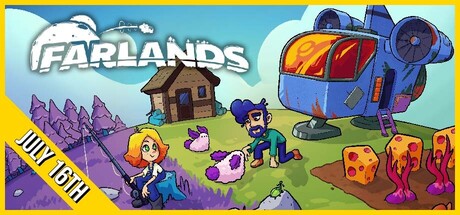
Farlands hands you the deed to your very own planet — an agrarian rock parked at the edge of the galaxy that was, suspiciously, almost free. From that opening joke the game settles into a cozy farming and survival simulation with light RPG threads: you arrive on a near-empty world and have to make it livable, one harvest and one tool at a time. It blends Casual, Indie, RPG, and Simulation in a way that rewards steady, low-pressure progress rather than reflexes.
Day to day, you clear and shape your land, plant and gather crops, tend animals, gather resources, and craft the gear that lets you push a little further across your planet's surface. Because it is an Early Access title, the world keeps growing as development continues, and the offline account reflects the build currently on Steam — so the planet you settle is the same one other players are settling right now, with the same systems and content in place.
If you like the rhythm of games where you turn a hostile or empty place into a working home — planting, building, exploring, and slowly understanding the strange little world you landed on — Farlands fits that mood neatly. The offline account is simply the cheapest, fastest way to start that solo journey: log in, go offline, and begin terraforming your own corner of the galaxy for $9.99.
// pros
- Save ~44% — $9.99 instead of ~$17.99 on Steam
- Instant, automated delivery the moment crypto payment confirms
- Full single-player farming sim playable in Offline Mode
- Crypto payment — no card needed, no region lock, worldwide
- Free replacement guarantee if access ever stops
// good to know
- · Single-player / offline only — no online multiplayer
- · You play in Steam Offline Mode on a shared account, not your own personal Steam profile
Playing Farlands offline
Pay with crypto
Checkout in USDT, BTC, ETH or LTC — no card needed.
Get the login
We deliver the account that owns the game, automatically, in minutes.
Play offline
Sign in, switch Steam to Offline Mode with our guide, and enjoy the full game.
Farlands — questions
Can you play Farlands offline?
Yes. You log in once to verify, switch Steam to Offline Mode, and play the full Farlands single-player farming sim with no connection needed. Your save data stays on your machine.
How much is Farlands on bonege?
$9.99 one-time, versus about $17.99 at full price on Steam — roughly 44% off for offline access to the game.
How fast is delivery?
Instant and automated. As soon as your crypto payment confirms, the Farlands offline account details are sent to you with a short setup guide.
How do I pay?
Crypto only — USDT (TRC20), BTC, ETH, or LTC. No card and no billing region required, so it works worldwide.
What's the difference vs a Steam key?
A key activates Farlands on your own account, often with region or currency limits. This is a shared offline account that already owns Farlands — you play it in Offline Mode for a lower flat price with instant delivery.
Is it safe?
It is a shared offline account, not an official key. Sign in, verify once, then play in Offline Mode and leave the credentials unchanged. If access ever stops, you get a free replacement.



